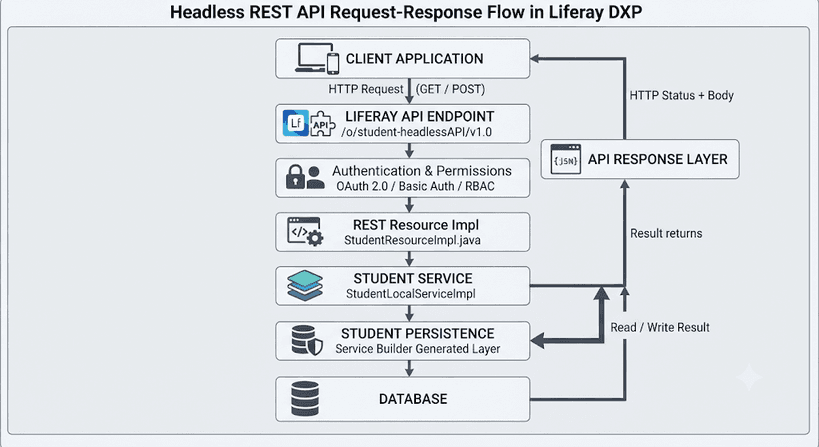
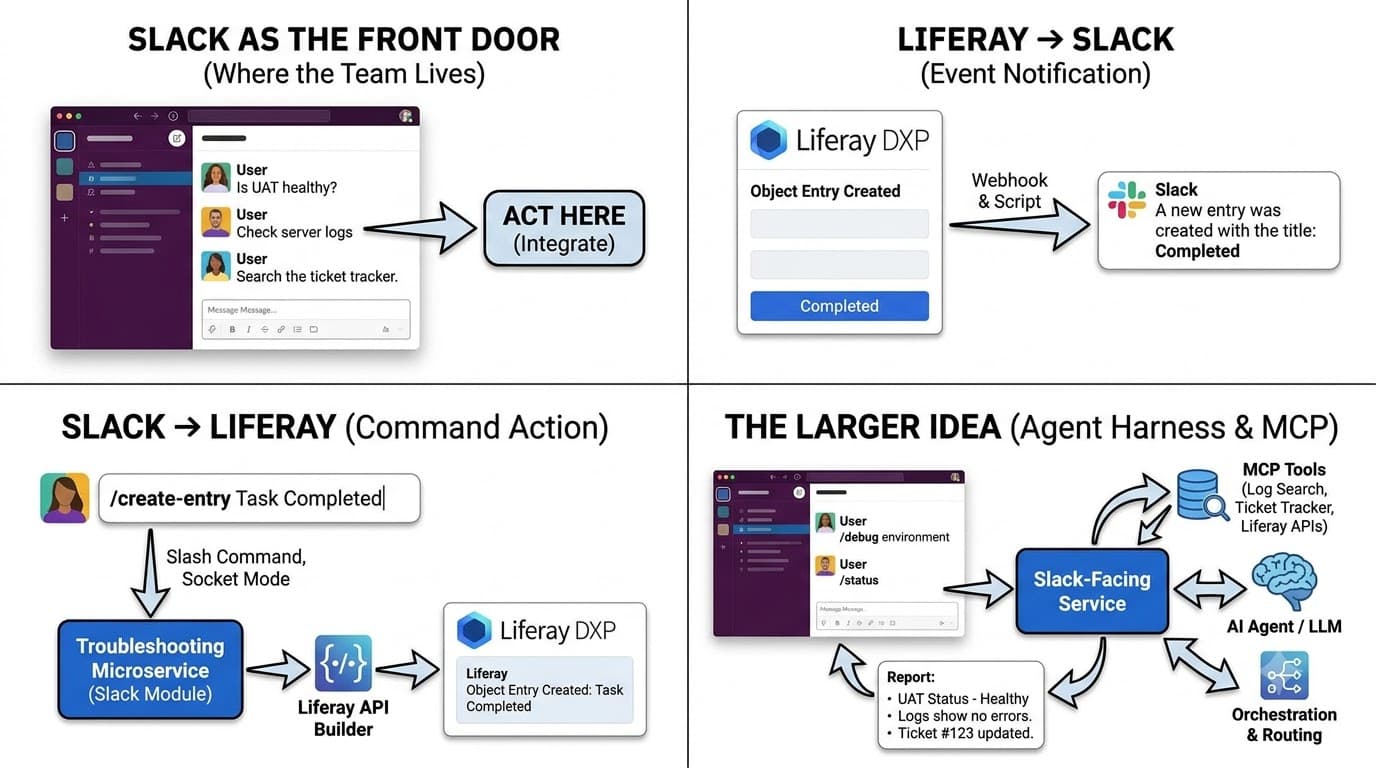
A two-way Liferay DXP and Slack integration, and the larger idea it was built to test: Slack as the place a project team troubleshoots, queries and orchestrates a Liferay implementation.
Your team already lives in Slack. Your tooling doesn't.
On a large Liferay DXP programme, "is UAT healthy?" rarely has a one-place answer. One developer checks the server logs, another opens the Control Panel, someone searches the ticket tracker, and the answer finally lands in a Slack thread. That is where the question was asked in the first place.
That last step is the clue. Developers, testers and project managers already coordinate in Slack. What they lack is a way to act from there: ask the platform a question, trigger a job or raise an issue without leaving the channel.
This post walks through a small proof of concept we built, a two-way integration between Liferay and Slack, and what it is really a proof of.
Slack as the front door, not the destination
The integration itself is small: it moves a single record between Liferay and Slack, in both directions. That was deliberate. With a trivial payload, the plumbing is the only thing being tested.
The goal is an interface. Behind it sits a microservice, and eventually an agent harness, that knows the project: its environments, its Objects, its tickets and its runbooks. In front of it sits Slack, where the team already works. From a channel, a developer should be able to:
- Initiate tasks without opening a terminal or the Control Panel.
- Troubleshoot issues by pulling logs and health signals from a named environment.
- Query project information, such as an Object's fields or which release carried a fix.
- Trigger workflows that raise tickets, publish content or notify owners.
- Coordinate actions across environments, running the same command against dev, UAT or production.
Most Slack integrations are one-way. The system posts an alert and the conversation ends there. The difference here is that the message is also the way back in.
What we built: one Object, two directions
The proof of concept connects one Liferay Object to one Slack channel, both ways. Liferay tells Slack when something happens. Slack tells Liferay to make something happen. Events out and commands in are the two primitives everything later in this post is built on.
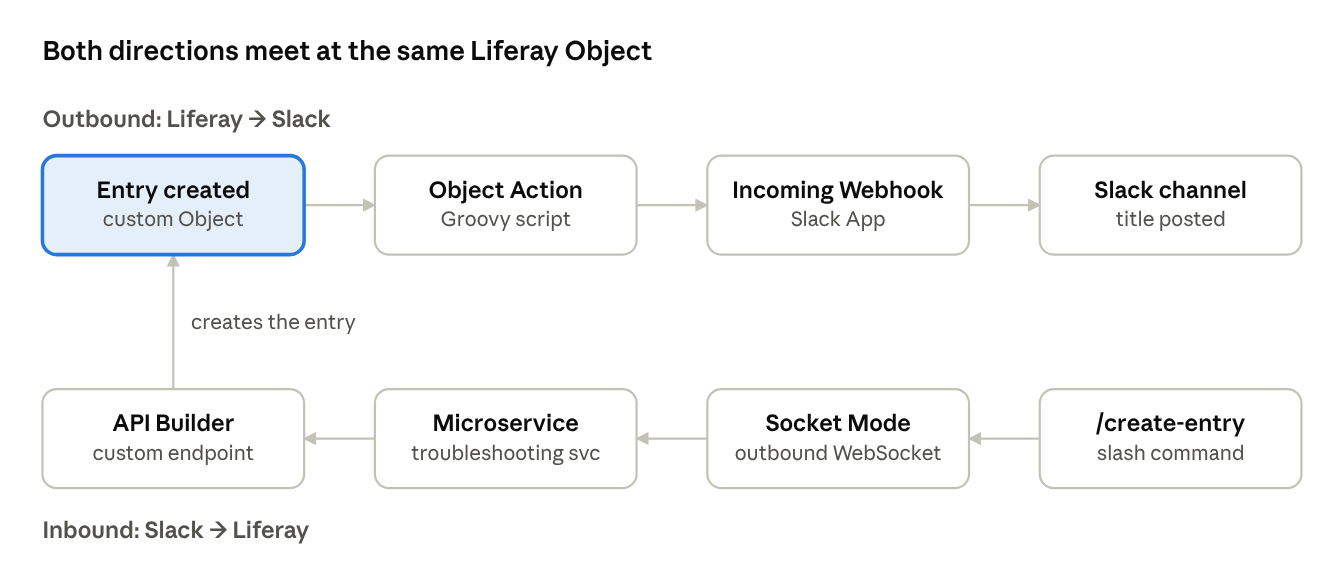
The outbound path runs entirely inside Liferay and Slack. The inbound path needs no new server: it runs as a module in the troubleshooting microservice we already had, and that microservice is the piece that grows into everything else in this post.
Liferay → Slack: an Object Action and a webhook
The outbound direction needs no middleware. Liferay Objects can run an action when an entry is created, and Slack accepts messages on an Incoming Webhook URL. A Groovy script joins the two.
The setup has three parts:
- A Slack App. Created from scratch at api.slack.com/apps and installed to the workspace. The app holds the webhook now and the slash command later.
- Create the app from scratch at api.slack.com/apps and pick your workspace.
- Turn on Incoming Webhooks and add a webhook for your channel. This gives you SLACK_WEBHOOK_URL.
- Turn on Socket Mode and generate an app-level token with the connections:write scope. This is SLACK_APP_TOKEN (xapp-…).
- Under Slash Commands, add /create-entry with the usage hint title. In Socket Mode it needs no request URL.
- Under OAuth & Permissions, make sure the bot has the commands scope.
- Install the app to the workspace and copy the bot token. This is SLACK_BOT_TOKEN (xoxb-…).
- An Incoming Webhook. Activated in the app, bound to one channel, and tested from Postman with a plain {"text": "..."} POST before Liferay is involved. A 200 ok there means any later failure is on the Liferay side, which halves the debugging.
- A custom Object. A custom Object with a title field, a panel link so it shows in the Control Panel, and an Object Action whose trigger is entry creation and whose type is Groovy script.
Object fields are available to the script as variables, so the script only has to format a message, POST it and check the answer:
import groovy.json.JsonOutput
// The webhook URL is a credential: keep it out of the script.
String webhookUrl = System.getenv("SLACK_WEBHOOK_URL")
String payload = JsonOutput.toJson([
text: "A new entry was created with the title: " + title
])
HttpURLConnection conn = (HttpURLConnection) new URL(webhookUrl).openConnection()
conn.setRequestMethod("POST")
conn.setDoOutput(true)
conn.setRequestProperty("Content-Type", "application/json")
try {
conn.outputStream.withWriter("UTF-8") { it << payload }
int status = conn.responseCode
if (status == 200) {
println "Posted to Slack"
} else {
// Slack explains a rejection in the body, e.g. no_service or invalid_payload
println "Slack rejected the message: HTTP ${status} ${conn.errorStream?.text}"
}
} catch (Exception e) {
println "Error sending to Slack: ${e.message}"
} finally {
conn.disconnect()
}
Create an entry and the channel shows "A new entry was created with the title: Completed" a moment later. Three details are worth copying. JsonOutput escapes quotes in a title that would break hand-built JSON. The webhook URL lives in configuration, not in a script anyone with Object admin rights can read. And the script reads Slack's answer: a revoked or mistyped webhook comes back as an error status with a short reason, and the log says so instead of treating every reply as success.
On Liferay SaaS, where server-side Groovy isn't available, the same job moves to a Webhook action pointed at the microservice, or to a client extension.
Slack → Liferay: a slash command into the microservice we already run
The inbound direction is where Slack stops being a notice board. A user types /create-entry Task Completed and a new Object entry appears in Liferay.
There is no new server for this. The Slack handler is a module inside our existing troubleshooting microservice, the same service that will later answer /debug and /status.
| Piece | Its job |
| Slack slash command | /create-entry, usage hint title; delivered to the app over Socket Mode |
| Socket Mode | An outbound WebSocket from the microservice to Slack: no public URL, no tunnel, no inbound firewall rule |
| Troubleshooting microservice (Slack module) | Parses the command, acknowledges it, calls Liferay, reports the result |
| Liferay API Builder | A custom create-entry endpoint whose POST schema maps onto the Object's title field |
The module uses Slack's Bolt SDK. Its one important habit is acknowledging Slack before it talks to Liferay:
const { App } = require("@slack/bolt");
const liferay = require("./liferay-client"); // the microservice's existing Liferay client
const slack = new App({
token: process.env.SLACK_BOT_TOKEN,
appToken: process.env.SLACK_APP_TOKEN, // app-level token for Socket Mode
socketMode: true,
});
slack.command("/create-entry", async ({ command, ack, respond }) => {
// "/create-entry Task Completed": everything after the command is the title
const title = command.text.trim();
if (!title) {
await ack("Usage: /create-entry <title>");
return;
}
// Slack gives a command three seconds. Acknowledge first.
await ack(`Creating entry: "${title}"...`);
try {
await liferay.post("/o/c/slack-api/create-entry", { title });
await respond(`Created "${title}" in Liferay.`);
} catch (err) {
await respond(`Couldn't create "${title}": ${err.message}`);
}
});
module.exports = () => slack.start();
ack() has to land within three seconds or the user sees a timeout error, even if the entry is created. respond() then posts the real outcome, so the user learns whether the entry exists, not just that the request arrived. The payload is the Object's one field, in keeping with the point of the POC: the plumbing is what's under test. The example uses Bolt for JavaScript; Bolt for Python and Java follow the same shape.
If the microservice runs as a Liferay client extension, its Liferay client already authenticates with the OAuth 2 application Liferay provisions for it. No password sits in the Slack module.
On the Liferay side there are two ways to receive the call. Every Object gets a generated headless REST API under /o/c/, which works out of the box. We used API Builder instead. It is available from Liferay DXP 2023.Q4 and Portal 7.4 GA102, and was a beta feature at the time of writing, switched on under Instance Settings → Feature Flags → Beta. Beta features can change between quarterly releases, so check the feature flags on your own DXP version first. API Builder gives you an API application with its own endpoint and a POST schema that decides exactly which fields a caller may send. For an external system, that narrow contract is a better thing to expose than an Object's full API.
What changes when Slack can act on production
A channel that only receives alerts is low risk. A channel that can create content, run jobs and touch every environment is not. Three things have to be true before the proof of concept grows into that:
- Guard the Slack tokens. With Socket Mode there is no public endpoint to forge requests against; the bot token and the app-level token are what prove a connection is yours. Keep them in the microservice's secret store. If the app ever moves to HTTP Request URLs, verify every request against the signing secret.
- Act as the person, not as a shared account. A client extension's OAuth 2 application is still a single identity, so scope it narrowly and map each Slack user to a Liferay user so Liferay's own permissions decide what that person can do in each environment. It is the same argument we made for retrieval in permission-aware RAG on Liferay DXP: don't build a second access model.
- Treat webhook URLs as passwords. Anyone holding a webhook URL can post into your channel. Keep secrets in configuration, never in scripts, and rotate any that have been committed, pasted into a document or shared in a screenshot.
Where it goes next: from one slash command to an agent harness
The POC has one command and one destination. The target has a command surface, with the same microservice reaching many tools. Socket Mode is already in place, so the remaining change is what sits behind the service.
MCP between the service and the tools. Each capability, from Liferay's headless APIs to log search and the ticket tracker, is exposed as a Model Context Protocol tool. The Slack-facing service doesn't call systems directly; it calls tools, and an agent decides which ones a request needs. Adding a capability means adding a tool, not writing another slash-command handler.
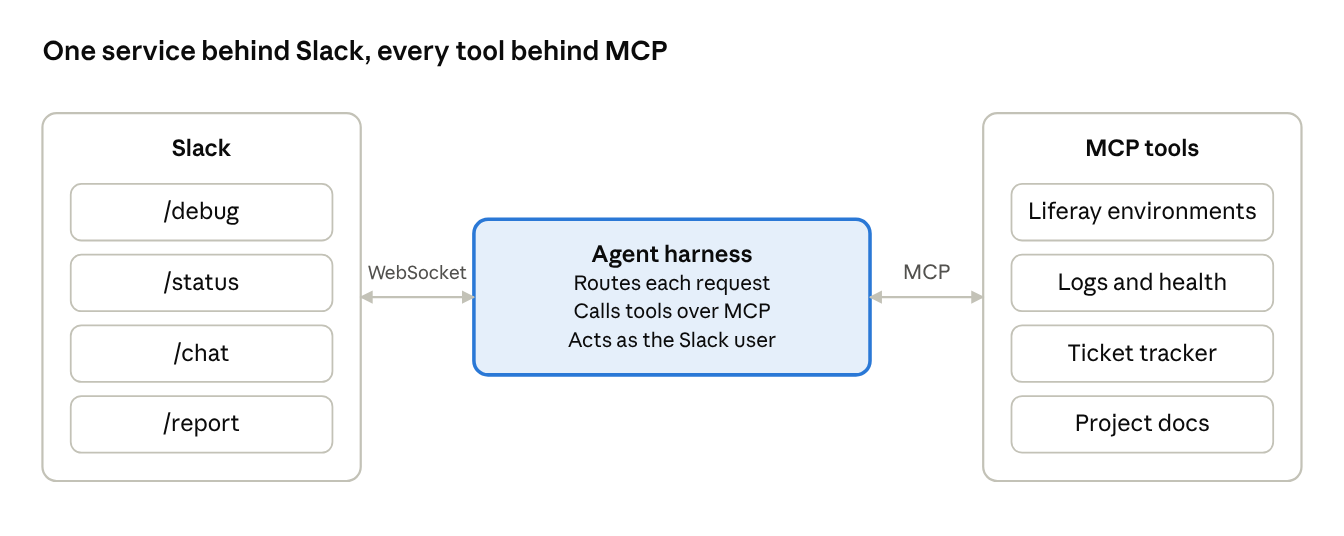
Slack talks to one service; the service reaches every system through the same protocol.
The command surface we sketched for it:
| Command | What it does |
| /debug | Pulls logs and recent errors for an environment or module, and points at the likely cause |
| /status | Reports the health of each environment |
| /chat | Answers free-form questions about the project from its docs, schemas and tickets |
| /report | Posts a structured project report to the channel on request |
Issues get a fixed path rather than a free-for-all:
- Create the ticket from the Slack thread where the issue was raised, with its context attached.
- Publish it to the tracker and the project channel.
- Notify the owners of the affected module or environment.
- Solve it and record the resolution steps, so the fix is there for /chat to find next time.
Not every message needs an agent. A fast routing step can decide whether a request needs a tool call, a plain answer or a person, the pattern we covered in routing agent decisions. And for clients who can't send project data to a hosted model, the harness can run on an on-prem LLM inside their own network.
.png&w=3840&q=75)