The problem
Imagine a company where Finance, HR and Legal each keep sensitive knowledge in Liferay: budget forecasts, employee policies, contracts. A RAG system on top of that content can answer questions in seconds, grounded in the company's own material.
But a RAG system that can retrieve everything can also expose everything. Once a restricted passage lands in the prompt, the model may quote it, paraphrase it or summarize it, no matter how carefully the prompt is written. So access control has to happen at retrieval time, before anything reaches the model.
Two ways to secure retrieval
A common pattern is to stamp each chunk of content with an access label, such as a department or access level, copy it into a separate vector database, and filter by that label at query time. It works, but the access rules now live in two places: the source system and the index. The application must always pass the right filter, and labels must be re-synced whenever permissions change.
Liferay makes a different approach possible. It already knows who can see what, through roles, user groups, sites, spaces and per-asset permissions, and its search framework enforces that on every query. The proposition is simple: don't build a second access model for RAG. Retrieve as the user, and let Liferay do the filtering.
What Liferay already provides
Liferay groups permissions into roles and scopes them. Regular roles apply across the whole virtual instance, organization and site roles apply to one organization or site, and space roles apply to a single space, asset library or design library. Roles reach people through user groups and memberships, and individual assets and folders carry their own permissions on top. That last layer lets you lock down a single "Salary bands" folder inside an otherwise open HR space.
In other words, the "security labels" a RAG system needs already exist. They are the permissions your administrators manage today.
How permission-aware retrieval works
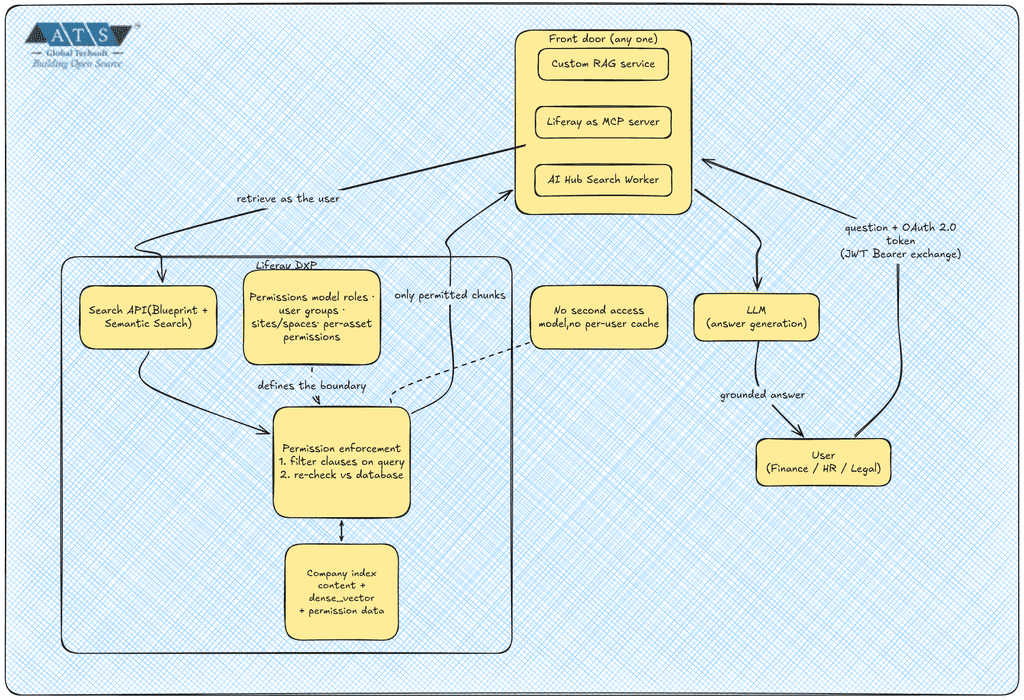
Liferay checks permissions twice on every search. First, it adds permission filter clauses to the query so the search engine returns only results the user can view according to the index; then, before results are returned, it re-checks them against the database in case the index holds stale permission data.
Semantic search plugs into the same pipeline. When enabled, Liferay produces a vector representation of the content and stores it as a dense_vector field in each document of the company index; at search time, the query is vectorized the same way so results can be matched by meaning. Because the vectors and the permission data live in the same index document, a single query returns only what the user may see, ranked by relevance.
One rule follows from this: always retrieve through Liferay's search API rather than querying the search engine directly. The permission checks live in Liferay's search framework, and bypassing it means rebuilding them yourself.
The architecture in four building blocks
- Permissions model. Group people into user groups per department, assign roles scoped to their space or site, and restrict sensitive folders. This is the security boundary.
- Content labels. Use categories, such as a Department vocabulary, for relevance and scoping, not security. If an author miscategorizes a document, permissions still protect it.
- Retrieval logic. Combine Semantic Search with a Search Blueprint to get hybrid keyword and vector retrieval. Blueprints can use the current user's context, such as their regular role IDs, user group IDs and categories, as variables, and the headless search API lets a request name a blueprint and pass custom attributes to it.
- Identity propagation. Every retrieval should carry the end user's OAuth 2.0 token. If users sign in through a corporate identity provider, Liferay's JWT Bearer flow can exchange a signed JWT from an external token service for a Liferay access token for that user. Avoid a shared service account: its permissions would become everyone's permissions.
Where the RAG can run
The same blueprint can sit behind different front doors. A custom RAG service can call Liferay's search API with the user's token. Liferay can also act as an MCP server for AI applications, and both of its authentication schemes identify the Liferay user behind the request, so the AI client operates with that user's permissions. Data masks can redact sensitive values such as emails or ID numbers from MCP responses before they reach the AI application, though masking is not an access control. For low-code orchestration, a community AI Hub example builds RAG from Search Worker agents that each retrieve through a Liferay Search Blueprint. Verify which identity AI Hub retrieval runs as before exposing sensitive content, and note that AI Hub data sources are crawled external websites, so they carry no Liferay permissions.
Things to get right
Test at the retrieval layer, not just the final answer: a Finance user should never retrieve HR-only documents, even if the model would have refused to repeat them. Check embedding coverage, since classic web content with custom structures only uses the article's title for the embedding, and by default up to 500 characters are sent to the embedding provider. Favor short, focused content over long documents. And never cache retrieved results or answers across users with different permissions.
Conclusion
Securing RAG usually means building and maintaining a parallel access model. On Liferay, the labels are the permissions you already manage, the filter is applied by the platform from the user's identity, and your job shrinks to three things: model permissions well, retrieve as the user, and prove it with tests.