Why a checklist, not an estimate
Every Liferay upgrade we have been asked to rescue went wrong in the same way: the team estimated the work from the version numbers and discovered the portal itself in the middle of the project. The custom theme nobody had touched since 6.2, the SOAP integration the finance team depended on, the Solr index that had never been rebuilt. None of it was in the plan because nobody had listed it.
This is the checklist we work through on our own Liferay upgrade and migration projects, from the first inventory to the month after cut-over. It is written for the team that owns the portal — architects, the operations lead, whoever has to sign off the go-live. Tick it honestly and the estimate takes care of itself; the version you start from decides the size of the job, but the inventory decides whether it finishes on time.
Liferay's own upgrade documentation covers the mechanics of each step. What follows is the order we do them in and the questions the documentation cannot answer for you.
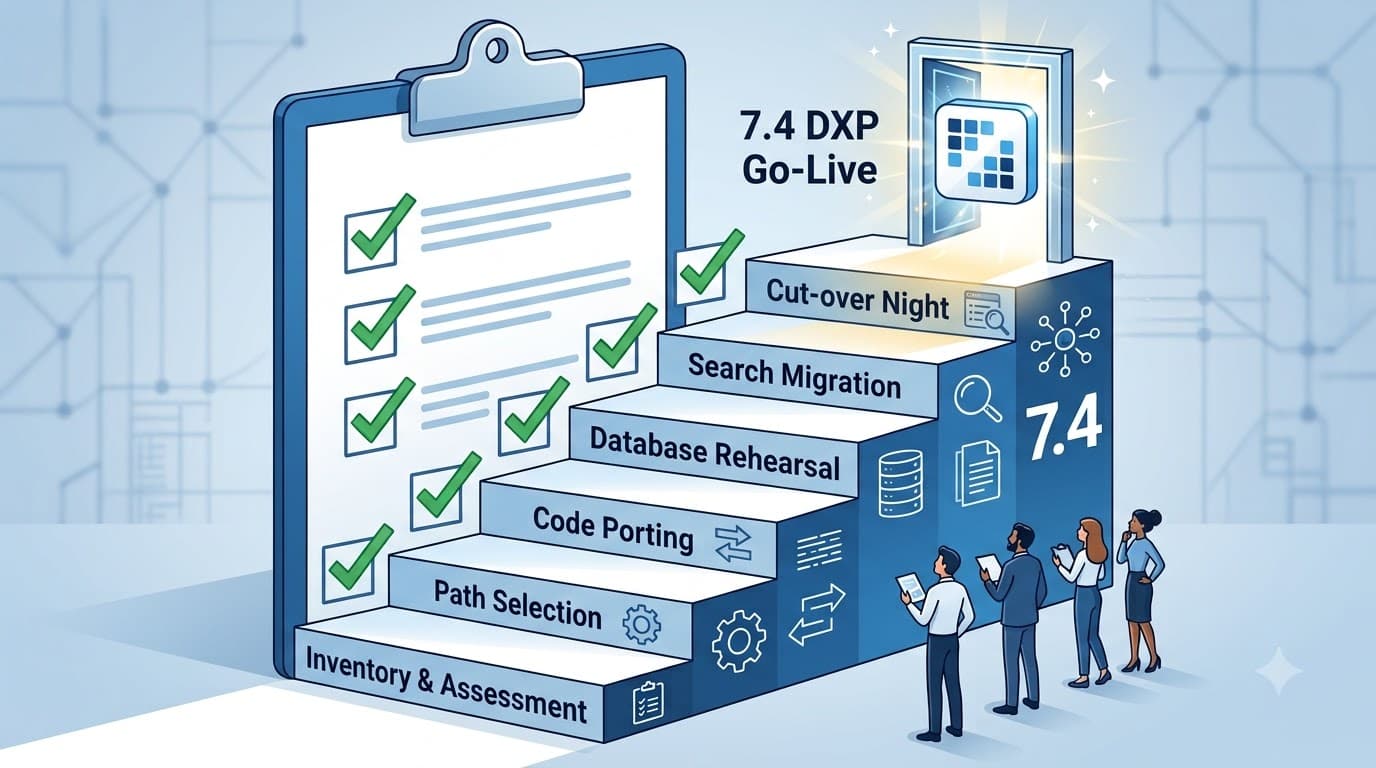
1. Inventory: know what you are upgrading
Nothing else on this list is reliable until this section is complete. Record it in a shared document, not in someone's head.
- Exact version and patch level — not "7.2" but the fix pack or update. The upgrade tool's behaviour and the list of breaking changes both depend on it.
- Runtime — JDK version and vendor, application server and version, database engine and version, operating system. Compare each against the compatibility matrix of the 7.4 release you are targeting, not of 7.4 in general; the supported list changed across the update and quarterly releases.
- Custom code, by type — OSGi modules, plugins-SDK WARs, ext plugins, JSP overrides (fragments), hooks and core patches, Service Builder entities, custom themes and layout templates. Count them and note when each was last built. Code that has not been compiled in three years usually cannot be compiled today.
- Front-end frameworks in use — AlloyUI, Metal.js, Senna, jQuery plugins, React, Clay. This single line predicts most of the front-end effort.
- Content model — web content structures and templates (FreeMarker or Velocity), document types and metadata sets, custom fields, vocabularies, workflow definitions.
- Integrations — LDAP, SSO (SAML, OpenID Connect, CAS), SOAP and REST clients, scheduled jobs, message-bus listeners, anything reading the database directly.
- Search — embedded Elasticsearch, remote Elasticsearch and its major version, or Solr.
- Data volume — rows in the largest tables, size of the document library on disk, number of sites, users, roles and workflow instances. This drives the upgrade tool's run time and the cut-over window.
- Environments and pipeline — how many environments exist, how a build reaches production today, and whether that process is written down.
2. Decide the path before you decide the date
The inventory tells you which of three upgrades you are actually doing, and each has a different shape.
- 7.3 → 7.4 is continuous. OSGi modules, Liferay Workspace, FreeMarker themes and the headless APIs carry over. The work is the database upgrade, a dependency and Java refresh, and a Clay and JavaScript update for anything still on Metal.js. From our projects: four to eight weeks with a modest custom-code base.
- 7.0, 7.1 or 7.2 → 7.4 keeps the code model but not the front end. Themes built for early 7.x, portlets on Senna and Metal.js, and hand-assembled layouts need rework; SOAP web services and a set of deprecated APIs are gone. Three to five months.
- 6.1 or 6.2 → 7.4 is a rebuild in place. Liferay's upgrade tool takes a 6.2 database to 7.4 in one run (6.1 steps through 6.2 first), but plugins-SDK portlets, ext plugins, Velocity themes and the 6.x permission system do not port — every custom feature is re-implemented as an OSGi module, a fragment, an Object or a client extension. Five to nine months.
There is a fourth path that is really a business decision: consolidation. If the organisation runs several portals with separate logins and separate teams, the upgrade is the moment to fold them into one DXP instance. ICICI Bank brought four legacy applications onto a single 7.4 platform that way and cut infrastructure cost by 45% — but a consolidation is planned as a programme with one application per phase, not as an upgrade with extras.
3. Code: what ports, what is rewritten, what is retired
Go through the custom-code inventory line by line and classify every item as keep, port, replace or retire. The last category is the one teams skip, and it is where the savings are — a portlet nobody has opened in two years does not need to be upgraded.
- OSGi modules from 7.x: update the target platform in Liferay Workspace, rebuild, fix compile errors against the deprecations and breaking-changes reference for every version you are crossing, not just the last one.
- Anything on AlloyUI, Metal.js or Senna: rebuild on Clay or React. In the ICICI consolidation the MVC portlets were refactored to React portlets during the move rather than after — page load improved 55% and the front end never had to be touched twice.
- Plugins-SDK WARs, ext plugins and core patches: rewrite as OSGi modules or, where they only change behaviour at the edges, as client extensions. Core patches are the item most likely to be undocumented; diff the running portal against a clean distribution of the same version to find them.
- JSP overrides: check each against the 7.4 JSP it overrides. Many no longer exist, and the ones that do have changed.
- Service Builder entities: port them, or ask whether a Liferay Object now does the job without code. Business-owned data that changes shape often is a good candidate for Objects; data that other systems integrate with is usually not.
- Velocity templates (themes, web content, ADTs): convert to FreeMarker. Do it with a script for the mechanical part and a person for the rest.
- SOAP clients: move to the headless REST or GraphQL APIs. Our headless integration team scopes this when the integration surface is large.
- Scheduled jobs and message-bus listeners: confirm each still fires after the upgrade; several scheduler APIs changed across 7.x.
4. Database and document library: rehearse, time, reconcile
The database upgrade is the one step that cannot be undone on the night, so it is the one we rehearse most.
- Take a full backup of the database and the document library, and restore it somewhere else to prove the backup works. An untested backup is a hope.
- On a 6.x portal, confirm the permissions algorithm is 6 before anything else; the upgrade tool requires it.
- Clean up before you upgrade: orphaned users, expired workflow instances, dead sites, unused web content versions. Every row you delete is a row the upgrade tool does not have to process, and on a large portal that is hours off the cut-over window.
- Run the upgrade tool on a fresh copy of production and time it. Then run it again after the clean-up and time it again. That second number is your maintenance window.
- Copy the document library store alongside the database, and check that the file count on disk matches the file-entry rows in the database before and after. Missing binaries surface as broken download links weeks later.
- Write the reconciliation report now, not on the night: counts of users, roles, sites, pages, web content articles, documents, workflow instances and every custom entity, captured before and after each run, with every difference explained in writing. On the Engineers India Limited repository we moved 200,000+ engineering documents to DXP 7.4 with zero loss; that outcome was a reconciliation discipline, not luck.
5. Search is its own migration
- Solr does not come with you: move to Elasticsearch.
- Old Elasticsearch moves to a major version supported by your 7.4 release, as a separate cluster. The embedded sidecar is for development, not production.
- Plan a full reindex after the upgrade, and time it on production-shaped data — on a document-heavy portal it can outlast the database upgrade.
- List every page that is really a search: asset publishers with filters, custom search portlets, faceted document libraries. Each one is a regression test.
- Custom analyzers, synonyms and field mappings need to be carried across by hand. Nothing migrates them for you.
6. Configuration, content and URLs
- Diff
portal-ext.propertiesagainst the 7.4 defaults; remove properties that no longer exist and note the ones whose defaults changed. - Export OSGi configuration (
.configfiles) from the old portal and review each — component names and property keys moved between releases. - Decide, page family by page family, whether hand-built layouts become content pages and fragments now or in a later phase. Doing it during the upgrade is cheaper than a second project; doing it for every page delays the go-live. Pick the high-traffic templates.
- Web content structures and templates: render every template on 7.4 with real content, not the sample article.
- Friendly URLs: export the list of public URLs from the old portal and confirm every one resolves on the new one, or has a redirect in Redirect Management. A migration that changes URLs without redirects hands its search rankings to competitors.
- Email templates, notification templates and site-level settings: they are stored data, but they are also the parts people notice first.
7. Security and integrations
- Re-test SSO end to end on the staging upgrade: SAML or OpenID Connect configuration, attribute mapping, role assignment on first login, logout.
- LDAP import and export settings, and the schedule they run on.
- OAuth2 applications and API keys used by integrations; headless API authentication changed across 7.x.
- Role and permission regression: a scripted check that a sample user from each role sees exactly what they saw before. This is where "the upgrade broke something" complaints come from most often, and it is entirely testable in advance.
- TLS termination, security headers and CORS configuration on the new environment.
- Third-party marketplace apps: confirm each has a 7.4-compatible release, or plan its replacement.
8. Testing and rehearsal
We run the whole upgrade at least three times: on a copy of production during assessment, on staging with the ported code, and on the night. Between the second and third run:
- Functional regression on the ported customisations, by the people who use them, with sign-off recorded.
- Performance test on production-shaped data and a production-shaped cluster. Page timings from the old portal are the baseline; nothing goes live slower than it was.
- A rollback rehearsal: restore the old database and document library, start the old version, confirm it works. If rollback has never been practised it does not exist.
- A written cut-over runbook with named owners and timings for every step, including the decision point at which you roll back instead of pushing on.
9. Cut-over night
- Content freeze announced and enforced — no edits on the old portal from the freeze onward, or the reconciliation cannot pass.
- Final backup of database and document library, checksummed.
- Upgrade tool run, timed against the rehearsal.
- Reconciliation report executed and signed by the portal owner — not by the engineers.
- Reindex, then smoke test the search-driven pages.
- Smoke test through SSO with a real user from each role.
- Switch traffic; keep the old environment untouched and reachable until the rollback window closes.
- Monitor logs, error rates and page timings through the first business day, with the upgrade engineers on call.
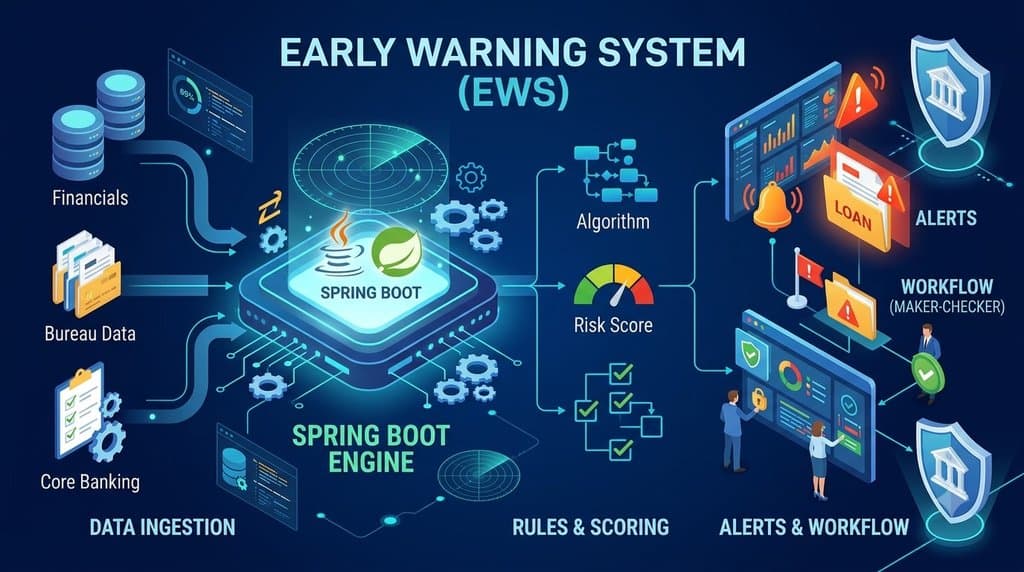
On the Bank of Baroda EWS re-platforming — Liferay DXP 7.4 in front, Spring Boot behind, three merged banks' worth of data — this discipline delivered the migration with zero data loss and 100% data integrity, and the same runbook shape carried be'ah's national service portal through staging and production deployment on DXP 7.4 U62 with 100% data integrity across all records.
10. After cut-over: make the next upgrade small
The test of a good upgrade is the next one. Liferay now ships DXP 7.4 as quarterly releases, and a portal that leaves the project with every customisation in OSGi modules, fragments, Objects and client extensions takes each of those as a dependency bump and a regression run.
- A hypercare month with the engineers who did the upgrade on call.
- A patching cadence: who applies quarterly releases and security patches, on which environment first, with which regression suite.
- The inventory from section 1 kept current, so the next upgrade starts from a document rather than an archaeology dig.
- Retire the old environment on a date, in writing, once the rollback window has closed.
What the checklist has delivered
- ICICI Bank: four legacy applications consolidated on one DXP 7.4 platform; infrastructure cost down 45%, page load up 55% after the React portlet migration, operations overhead down 50% with a single support model.
- Engineers India Limited: 200,000+ engineering documents migrated to a DXP 7.4 repository; retrieval time from hours to seconds with Elasticsearch; audit preparation time cut by 75%.
- Bank of Baroda: EWS re-platformed on DXP 7.4 and Spring Boot with zero data loss; scaled to 3x data volume after the merger.
- be'ah Oman: DXP 7.4 U62 service portal deployed to staging and production with 100% data integrity; new service types configured in hours, not weeks, on Liferay Objects.
Start with the inventory — or let us run it
If the inventory in section 1 is more than an afternoon's work, that is itself the finding: the portal has more in it than anyone has written down, and the upgrade needs an assessment before it needs a date. Ours is a fixed fee, takes one to two weeks, and ends with every component classified, a timed dry-run of the database upgrade and a fixed price — whether or not you go ahead with us. Tell us which version you are on and we will take it from there.