Most LLM calls in production code don't need a paragraph back. They need a yes, a bucket, or a number. Is this passage relevant? Which queue does this ticket go to? How bad is this bug?
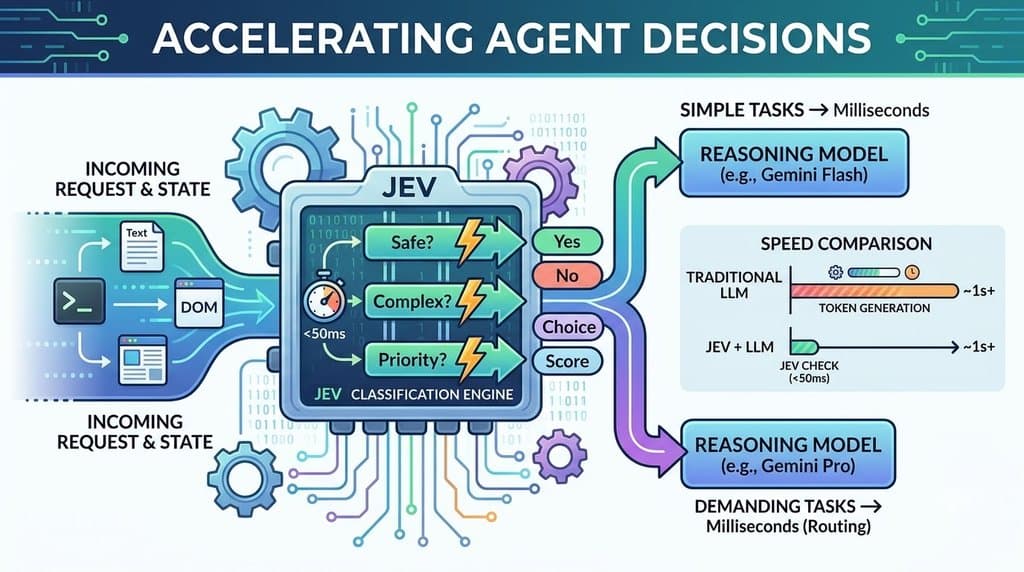
For two years we've faked that with chat completions: a prompt that begs for JSON, a regex to parse it, and a confidence score the model made up. OpenAI's new Decisions API removes the faking. You ask a typed question and get back a calibrated probability, a choice from your own list, or a score on your own rubric. OpenAI says it runs about 10x faster than the Responses API, and you pay for input tokens only.
Below are 10 use cases that each mix text and images in a single request. Each one is built on what the API supports today.
The API in 60 seconds
A request to POST /v1/decisions has three fields: model, input and questions. Right now gpt-6-luna is the only model, and the API is in public beta.
- input is the shared evidence: a plain string, or user messages that mix
input_textandinput_imageparts. - questions is an array. Each has a unique name, a type and instructions. The response returns an answers array keyed by those names.
There are three question types, and choosing the right one is most of the design work:
| Type | Ask it when | You get back |
|---|---|---|
| predicate | A condition is true or false | probability from 0 to 1 |
| choice | You pick one unordered option (department, category) | choice, a probabilities array, confidence |
| score | You rate against ordered levels (severity, quality) | score = probability-weighted average of level indices (can land between levels), plus probabilities and confidence |
A few rules from the docs that shape every design below:
- Images must be inline base64 data URLs. Hosted HTTP/HTTPS URLs and file_id inputs are rejected.
- Independent questions share one request; dependent ones don't. If question B depends on A's answer, send two requests.
- Any answer can be a refusal. Handle it as its own branch.
- Thresholds are yours to set, using labeled examples and the cost of false positives vs false negatives.
- It decides, it doesn't generate. Field extraction or written explanations belong to Structured Outputs; tool calls belong to function calling.
- Pricing: $0.10 per 1M input tokens, with no output, cache-read or cache-write charges. Regional and long-context multipliers still apply.
- Compliance: ZDR and HIPAA for eligible customers; data residency in the US and Europe (EEA + Switzerland).
from openai import OpenAI

client = OpenAI()

decision = client.decisions.create(
    model="gpt-6-luna",
    input="I was charged twice for my order.",
    questions=[{
        "type": "choice",
        "name": "department",
        "instructions": "Which department should handle this complaint?",
        "choices": [
            {"value": "billing", "description": "Payments, invoices, and refunds."},
            {"value": "shipping", "description": "Delivery and tracking."},
            {"value": "other", "description": "Requests outside these categories."},
        ],
    }],
)
answer = decision.answers[0]
if answer.type == "choice":
    print(answer.choice, answer.confidence)
Five design rules
Every use case below follows five rules from the guide. Use them as a checklist for your own ideas.
- Is the answer typed? It must fit predicate, choice or score. Anything that needs a sentence or an extracted field fails.
- Is the input supported? Text, or images as base64 data URLs only.
- Are the questions independent? Bundled questions must not depend on each other. Dependent steps become a chain of requests.
- Is there a fallback? Choice lists need an other bucket, and every path needs a refusal branch.
- Can you set a threshold? There has to be a labeled dataset and a known cost for being wrong, so the probability turns into an action.
10 use cases that mix text and images
The strongest pattern is neither text-only nor image-only. You send what your system already knows as text (a complaint, a purchase order, a spec) next to an image, and ask whether the two agree. One user message can combine input_text and input_image parts, so this is a single request.
| # | Use case | Text part | Image part | Question types |
|---|---|---|---|---|
| 1 | Refund claim check | Customer's complaint | Product photo | predicate + choice + score |
| 2 | Expense claim audit | Claimed amount and category | Receipt photo | predicate × 2 + choice |
| 3 | Goods receipt vs purchase order | PO line description | Carton photo | predicate × 2, then choice |
| 4 | Bug report triage | User's bug description | Screenshot | predicate + score + choice |
| 5 | Listing honesty check | Title, description, stated condition | Listing photo | predicate × 2 + choice |
| 6 | Proof-of-delivery audit | Customer's delivery instructions | Rider's photo | predicate + choice |
| 7 | Acceptance criteria in CI | Ticket's acceptance criterion | Playwright screenshot | predicate × 2 + score |
| 8 | Solar underperformance diagnosis | Inverter telemetry summary | Panel row photo | choice + score |
| 9 | Computer-use agent guardrail | Proposed agent action | Current screen | predicate + score |
| 10 | Visual RAG relevance gate | User's question | PDF page or chart image | predicate |
1. Refund claim check
Text: "The glass jar arrived cracked at the lid." Image: the customer's photo. Ask a predicate Does the photo show the damage the customer describes?, a choice for resolution (refund, replacement, needs_review, other) and a score for severity (Cosmetic, Usable with defect, Unusable).
Why it works: The three questions are independent, so they share one request. Pairing the complaint with the photo turns a damage check into a consistency check, which catches stock photos and photos of the wrong product.
2. Expense claim audit
Text: "Claimed: ₹2,340, Category: Travel." Image: the receipt. Ask a predicate Does the total on this receipt match the claimed amount?, a predicate Is the receipt legible and complete?, and a choice for expense category.
Why it works: The employee has already typed the amount, so the model only confirms it rather than extracting it. Mismatches go to the finance queue; everything else is auto-approved.
3. Goods receipt vs purchase order
Text: the PO line, "50 cartons, 1 L steel bottles, blue". Image: the clerk's photo of the delivered carton. Request 1 asks a predicate Does the delivered item match the PO description? and a predicate Is there visible damage to the product, ignoring packaging? If either flags, request 2 asks a choice for claim type (wrong_item, transit_damage, manufacturing_defect, other).
Why it works: The claim type only matters once something is flagged, so it runs as a second request. Vendor claims get raised at the dock, not weeks later.
4. Bug report triage
Text: "Export button does nothing in Safari." Image: the user's screenshot. Ask a predicate Does the screenshot show the problem the user describes?, a score for severity (Cosmetic, Workaround available, Fully blocked) and a choice for owning team.
Why it works: Severity is ordered and team is not, so each gets the right type. Reports with the wrong attachment are caught before an engineer opens them, and the backlog sorts by the raw severity score.
5. Listing honesty check
Text: title, description and the seller's stated condition ("Like new"). Image: the listing photo, encoded as base64 on your server. Ask a predicate Does the photo show the product named in the title?, a predicate Does the photo show wear inconsistent with the stated condition? and a choice for category.
Why it works: Buyers complain most when the photo and the description disagree. This flags those listings before they go live.
6. Proof-of-delivery audit
Text: "Flat 402, gated society. Leave with security at the main gate." Image: the rider's delivery photo. Ask a predicate Does the photo show the package left as the instructions describe? and a choice for where it was left (doorstep, security_desk, handed_over, street_or_vehicle, other).
Why it works: The same photo can be right for one order and wrong for another. Only the instructions tell the model which, and low-confidence answers go to a human rather than a rider penalty.
7. Acceptance criteria in CI
Text: the ticket's acceptance criterion, "Empty cart shows an illustration and a Continue shopping button." Image: the Playwright screenshot of that screen. Ask a predicate Does the screen meet this acceptance criterion?, a predicate Is any text truncated or overlapping? and a score for layout (Broken, Off but usable, Polished).
Why it works: Pixel diffs flag every intentional change. This checks the screen against what the ticket actually asked for, and it's fast enough to run on every PR.
8. Solar underperformance diagnosis
Text: "String 4 is producing 22% below string 3 since Monday." Image: a photo of string 4's panel row. Ask a choice for the likely cause (soiling, shading, cracked_cell, no_visible_cause, other) and a score for soiling (Clean, Light dust, Heavy soiling).
Why it works: The telemetry says something is wrong; the photo says what. no_visible_cause sends the ticket to an electrician instead of a cleaning crew.
9. Computer-use agent guardrail
Text: the agent's next action, "click 'Confirm' to finish cleanup". Image: the screenshot the agent is looking at. Ask a predicate Will this click confirm a payment, a deletion or a message to someone outside the company? and a score for reversibility (Read-only, Reversible, Irreversible).
Why it works: The action text alone hides what "Confirm" means; the screen shows it. Irreversible actions pause for human approval, and the check is fast enough to run before every step.
10. Visual RAG relevance gate
Text: the user's question. Image: one rendered PDF page, chart or diagram from your retrieval results. Ask a predicate Does this page contain information that helps answer the question? Keep only pages above your threshold before the expensive answer call.
Why it works: Scanned manuals and slide decks hide their answers in figures that text retrieval misses. Send one request per page, in parallel, since every question in a request shares the same input.
What a mixed request looks like
import base64
from openai import OpenAI

client = OpenAI()
photo = base64.b64encode(open("delivery_88231.jpg", "rb").read()).decode()

decision = client.decisions.create(
    model="gpt-6-luna",
    input=[{"role": "user", "content": [
        {"type": "input_text", "text": "Delivery instructions: Flat 402, gated society. "
                                        "Leave with security at the main gate."},
        {"type": "input_image", "image_url": f"data:image/jpeg;base64,{photo}"},
    ]}],
    questions=[
        {"type": "predicate", "name": "followed_instructions",
         "instructions": "Does the photo show the package left as the instructions describe?"},
        {"type": "choice", "name": "drop_location",
         "instructions": "Where was the package left?",
         "choices": [
             {"value": "doorstep", "description": "At a flat or house door."},
             {"value": "security_desk", "description": "With a guard or at a gate desk."},
             {"value": "handed_over", "description": "In a person's hands."},
             {"value": "street_or_vehicle", "description": "On a road, pavement or vehicle."},
             {"value": "other", "description": "None of the above."},
         ]},
    ],
)
for a in decision.answers:
    if a.type == "refusal":
        print("refused:", a.name)
    elif a.type == "predicate":
        print(a.name, a.probability)
    elif a.type == "choice":
        print(a.name, a.choice, a.confidence)
Where not to use it
Know these limits before you reach for the API everywhere.
- Extracting data. Invoice numbers, dates, line items: use Structured Outputs.
- Explaining a decision. There is no free-text reason field. If an auditor needs one, generate it separately for the flagged cases.
- Chained logic in one call. "Is it damaged, and if so, what kind?" is two requests.
- Hosted image URLs or uploaded file IDs. Base64 data URLs only.
- Fully automated, high-stakes calls about people. Hiring, credit or medical decisions. A probability with no reasoning is a poor basis for an unreviewed decision about someone's life.
- Anything without labeled data. If you can't measure false positives and negatives, you can't pick a threshold, and the probabilities are just decoration.
What it costs, roughly
At $0.10 per 1M input tokens with nothing charged for output, the bill is mostly a function of how long your inputs are. Token counts below are estimates, and regional or long-context multipliers would raise them.
| Workload | Tokens per call (est.) | Volume | Cost |
|---|---|---|---|
| Bug report triage (#4), text part | ~250 | 1M tickets / month | ~$25 / month |
| Visual RAG gate (#10), text part | ~50 × 20 pages | 10k user queries / day | ~$1 / day |
| Agent guardrail (#9), text part | ~300 | 100k tool calls / day | ~$3 / day |
These rows cover only the text part. Every use case also sends an image, and the Decisions guide doesn't state how many tokens an image costs. Measure it on your own images before you budget.
The takeaway
The Decisions API isn't a smarter model. It's a narrower contract: you ask a closed question and get a number you can put a threshold on. That contract fits more of a real codebase than chat completions ever did, from the RAG gate to the agent guardrail.
It's still a beta with one model, so keep the Responses API path behind a flag. Start with whichever of your current classifiers has a labeled dataset, run both side by side for a week, and let the confusion matrix decide.