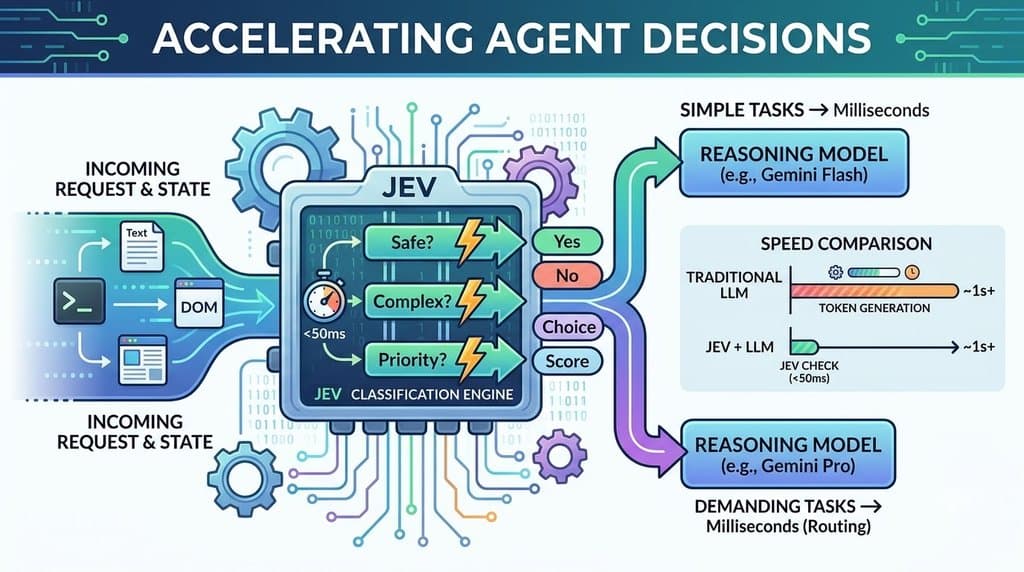

Most QA agents spend their time waiting on a large language model for every tap. TypeSafe’s Jev takes a different approach. It is a “System One” model built to make quick, structured choices, and TypeSafe reports response times of 70 to 500 milliseconds. Pair it with agent-device, an open-source tool that lets agents inspect and operate apps, and you get a lean loop: read the screen, pick an action, execute, repeat.
Callstack demonstrated this with a shopping flow. Here are three other scenarios showing how the same pattern applies.
How the loop works
- Snapshot: agent-device reads the app’s accessibility tree and returns labelled elements with references like
@e4. - Actions: your runner converts each snapshot into a menu of possible actions (press, fill, scroll, wait).
- Decision: Jev receives the task, the current screen, and the previous screen and action. It picks one option and returns probabilities for the others.
- Execution: agent-device carries out the chosen action, and the loop repeats until Jev picks pass, fail, or incomplete.
Jev doesn’t write text or call tools. Your code supplies every action, including any text to type, and stays in control of the loop.
Example 1: A failed login should stay failed
Negative tests are where a text-only decision model fits well. The task is simple: enter a wrong password and confirm the app rejects it.
The snapshot:
Plain Text
@e1 [text] "Welcome back"@e2 [textfield] "Email"@e3 [textfield] "Password"@e4 [button] "Sign in"Copy
The runner builds actions with the test data already filled in:
Plain Text
{ "id": "a3", "kind": "fill", "ref": "@e3", "target": "Password", "text": "wrong-password-123", "description": "Fill textfield \"Password\" with \"wrong-password-123\"."}CopyThe task prompt:
Enter a valid email and an incorrect password, tap Sign in, and verify that an error message appears and the user stays on the login screen.
After tapping Sign in, the next snapshot should contain something like @e5 [text] "Incorrect email or password". If Jev sees that, it can choose pass. If it lands on a home screen instead, that is a fail, and a serious one, since it means authentication let a bad password through.
Example 2: Applying a promo code in a food delivery app
Fill actions are also a way to test several inputs without letting the model invent anything. You can offer more than one option for the same field:
Plain Text
[ { "id": "a7", "kind": "fill", "ref": "@e9", "target": "Promo code", "text": "WELCOME10", "description": "Fill textfield \"Promo code\" with \"WELCOME10\"." }, { "id": "a8", "kind": "fill", "ref": "@e9", "target": "Promo code", "text": "EXPIRED2020", "description": "Fill textfield \"Promo code\" with \"EXPIRED2020\"." }]CopyThen vary the task prompt to steer which branch is tested:
Add a margherita pizza to the cart, open the cart, apply the promo code WELCOME10, and verify that the order total decreases.
Because the model chooses from predefined options, the test stays deterministic. It only “decides” the order of steps, not the data.
Example 3: A to-do app, from creation to completion
A multi-step flow shows why passing the previous screen and previous action matters. Here the task is:
Create a task called “Buy milk”, mark it complete, and verify it appears in the Completed list.
A typical run looks like this:
| StepScreenChosen action | ||
| 1 | Empty task list | Press “New task” |
| 2 | Task editor | Fill “Title” with “Buy milk” |
| 3 | Task editor, title filled | Press “Save” |
| 4 | Task list with one item | Press checkbox for “Buy milk” |
| 5 | Task list, item struck through | Press “Completed” tab |
| 6 | Completed list shows “Buy milk” | Pass |
Because Jev sees what changed between screens, it can tell that the checkbox press worked (the item is struck through) rather than assuming it did.
Calling Jev from your runner
The request follows the pattern shown in Callstack’s write-up. TypeSafe ships an official Python SDK alongside the JavaScript one, so the same call works in a Python runner too:
Plain Text
from typesafe_sdk import Choice, TypeSafeClientoptions = {a["id"]: a["description"] for a in actions}with TypeSafeClient() as jev: response = jev.system_one( model="jev-latest", state={ "task": prompt, "screen": snapshot, "previousScreen": previous_screen, "previousAction": previous_action, }, questions={ "nextAction": Choice( instructions="Choose the next action for the task.", criteria=options, ), }, )action_id = response.choices["nextAction"].choiceCopyTips for reliable runs
- Filter dangerous actions. Leave out controls like “Delete account” or “Confirm payment” unless the test needs them.
- Cap the number of steps. A run that loops forever should end as incomplete.
- Use the probabilities. Since Jev returns probabilities for each choice, you can flag or retry steps where the top choice isn’t clearly ahead.
- State what not to do. Phrases like “do not change any settings” in the task prompt help keep runs safe.
- Keep descriptions specific. “Press button ‘Add to cart’ at @e4” gives the model far more to work with than “Press button.”
Why this matters
If a model decides quickly and cheaply, you can afford to run more tests, more often, and get feedback sooner. TypeSafe reports up to 193.6x faster execution and 444.6x lower cost than the LLM configurations it tested, so check their benchmarks for the details before relying on those numbers.