Introduction
Modern applications often need to access backend data without depending on a platform's user interface. APIs make this possible by allowing external applications to retrieve information, create records, and interact with backend functionality through defined interfaces.
Liferay DXP supports Headless REST APIs and GraphQL for exposing application functionality to external clients. These approaches provide different ways to request data and perform operations while keeping backend implementation details separate from the consuming application.
Building a reliable API involves more than exposing an endpoint. It requires a clear API contract, appropriate service logic, secure access, reliable data persistence, and testing to verify the complete request flow.
This article explains how Headless REST and GraphQL work in Liferay DXP, how they interact with the service and persistence layers, and what to consider when implementing and testing them. A Student management example is used to illustrate the concepts.
1. Understanding the Architecture
Liferay's API architecture separates the client, API processing, business logic, and data persistence into distinct responsibilities.
The main components are:
- External client: Sends API requests using applications such as Postman or Swagger.
- Liferay DXP: Receives requests and applies the configured authentication and authorization mechanisms.
- REST resource implementation: Processes supported REST operations defined by the API contract.
- GraphQL schema and resolvers: Define and process the GraphQL operations exposed by the application.
- Service layer: Executes the relevant business logic.
- Persistence layer: Reads and writes application data.
- Database: Stores the application records.
Logical architecture
External Application (Postman / Swagger / Client) | v Liferay DXP | Authentication & Permissions | +------+------+ | | v v REST API GraphQL API | | v v REST Resource Schema / Resolver | | +------+------+ | v Service Layer | v Persistence Layer | v Database
The diagram represents a logical architecture. REST resources and GraphQL resolvers follow separate processing paths. They can use shared service logic when the implementation connects them to the same services.
This separation is important because API processing and business logic have different responsibilities. REST resources and GraphQL resolvers handle their respective interfaces, while the service layer can centralize business rules and data operations.
2. How Headless REST APIs Work
Headless REST APIs expose resources through URLs and use HTTP methods to perform supported operations.
Common methods include:
- GET: Retrieves data.
- POST: Creates a resource or submits data for processing.
- PUT or PATCH: Updates a resource, depending on the API contract.
- DELETE: Removes a resource, where supported.
The exact operations and request formats depend on the API being used.
GET request flow
A GET request retrieves existing data.
For example, a client might request student records from a custom API:
GET /o/student-headlessAPI/v1.0/students
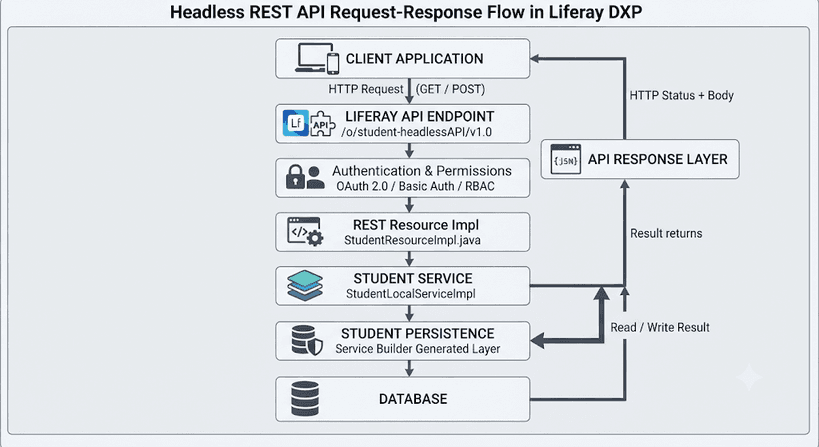
The request follows this general sequence:
- The client sends an HTTP GET request.
- Liferay processes the configured authentication and permission checks.
- The REST resource implementation processes the requested operation.
- The implementation invokes the relevant service logic.
- The service retrieves the required data through the persistence layer.
- The result is returned through the REST API to the client.
A successful retrieval commonly returns HTTP 200 OK. The response body and content type depend on the API contract and implementation.
POST request flow
A POST request submits data to create a resource or perform another supported operation.
For example, a student registration request might contain:
{ "name": "Rahul Kumar", "email": "rahul@example.com", "department": "Computer Science", "active": true}The general processing sequence is:
- The client sends a POST request with the request body.
- Liferay processes authentication and applicable permissions.
- The REST resource implementation validates and processes the request.
- The relevant service logic executes the operation.
- The persistence layer saves the record when creation succeeds.
- The API returns the result according to its configured response contract.
The server can generate identifiers through the service layer rather than requiring clients to supply primary keys.
After creation, a separate GET request can be used to verify that the new record is available.
3. How GraphQL Works in Liferay DXP
GraphQL provides a schema-based interface for requesting data and performing supported operations.
Unlike REST, which commonly exposes resource-specific URLs, GraphQL allows clients to submit queries and mutations through a shared endpoint.
In Liferay DXP, the GraphQL endpoint is commonly:
/o/graphql
The exact operations available depend on the GraphQL schema exposed by the deployed application and Liferay configuration.
GraphQL query flow
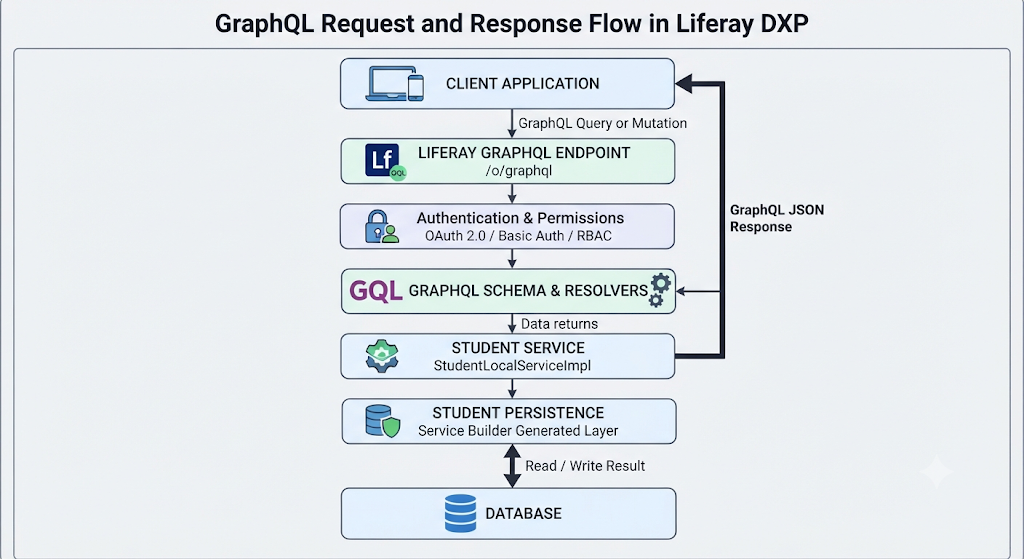
GraphQL Client | v /o/graphql | v GraphQL Schema | v Query Resolver | v Service Layer | v Persistence Layer | v Database | v Resolver Result | v GraphQL Response
A client submits a query describing the data it needs. The GraphQL processing layer validates the operation against the schema and invokes the configured resolver. The resolver obtains the required data through the implementation, which may call the service layer.
The result is returned in a GraphQL response, commonly containing a data property. Execution errors may also be reported in an errors property.
Example query
The following illustrates a query using a custom API namespace:
{ studentHeadlessAPI_v1_0 { students }}The namespace and field names are specific to the deployed schema. They are not universal names for every Liferay installation.
GraphQL mutations
Queries retrieve data, while mutations are used for supported operations that change data.
For example, a mutation might create a record through a configured resolver. The resolver executes the relevant operation and returns the result according to the schema.
GraphQL does not automatically expose every service method or invoke a REST resource implementation. The available operations depend on the schema and resolver implementations.
4. REST vs. GraphQL
Both approaches expose backend functionality, but they differ in how clients describe requests.
| Feature | REST Headless | GraphQL |
| Request model | Resources and HTTP methods | Queries and mutations |
| Endpoint pattern | Resource-specific URLs | Shared GraphQL endpoint |
| API contract | OpenAPI specification, where provided | GraphQL schema |
| Data retrieval | Defined by the resource operation | Defined by the query and schema |
| Write operations | POST, PUT, PATCH, or DELETE where supported | Mutations where supported |
| Testing tools | Postman and Swagger | GraphiQL and Postman |
REST is useful when an application interacts with clearly defined resources and operations. GraphQL can be useful when clients need to request specific data through a schema designed for their use cases.
Neither approach is automatically better in every situation. The appropriate choice depends on the application requirements, available operations, security configuration, and client needs.
5. Authentication and Authorization
APIs must control who can access them and which operations they can perform.
Liferay API access depends on the endpoint's security configuration. Depending on the setup, clients may use supported authentication mechanisms such as Basic Authentication or OAuth 2.0 bearer tokens.
A bearer-token request commonly includes this header:
Authorization: Bearer <access_token>
Authentication and authorization have different responsibilities:
- Authentication establishes the identity of the caller.
- Authorization determines whether that caller is permitted to perform the requested operation.
Typical HTTP outcomes include:
| Scenario | Typical response |
| Request succeeds | 200 a successful HTTP status |
| Authentication is missing or invalid | 401 Unauthorized |
| Caller lacks the required permission | 403 Forbidden |
Actual behavior depends on the endpoint and configuration.
OAuth 2.0 can allow an application to access protected APIs using an access token rather than supplying a user's password with every request. The application must still manage credentials, token expiration, scopes, and permissions securely.
A complete security test should verify both successful access and rejected requests. Obtaining a valid token alone does not prove that authorization rules are correctly enforced.
6. The Role of Service Builder and REST Builder
Liferay provides development tools that help implement data models and expose API functionality.
Service Builder
Service Builder generates model, persistence, and service infrastructure from entity definitions.
For example, a Student entity might contain an identifier, name, email address, department, and active status.
The service implementation can contain business rules and use the generated persistence components to interact with stored records.
This separation makes the backend easier to maintain because business logic does not need to be duplicated across multiple API interfaces.
REST Builder
REST Builder uses an OpenAPI specification to define the structure of a REST API, including its operations, request models, and response models.
It generates the API structure and resource classes. Custom implementation classes provide the behavior for the operations.
For example, a custom API might expose GET and POST operations for student records under a versioned path such as:
/o/student-headlessAPI/v1.0/students
The exact base path depends on the deployed API.
REST Builder and Service Builder serve different purposes: Service Builder supports the data and service layer, while REST Builder supports the REST API contract and implementation structure.
7. Understanding Data Relationships
Data modeling becomes increasingly important as applications grow.
Consider a system that manages students and courses. A simple implementation might store a course name directly in each student record. However, when many students belong to the same course, this approach can introduce duplication and inconsistent values.
A separate Course entity provides a more structured model.
For example:
Course
courseIdcourseNameduration
Student
studentIdnameemailcourseId
A one-to-many relationship would allow one Course to be associated with multiple Student records.
The relationship must be implemented explicitly in the data model and service logic. The backend should also validate referenced identifiers to prevent records from pointing to nonexistent entities.
This principle applies beyond student management: whenever one entity references another, the relationship and its validation rules should be part of the application design.
8. Testing API Operations
API testing verifies that the defined contract, service logic, security controls, and persistence behavior work together.
Tools such as Postman, Swagger, and GraphiQL can be used to test supported operations independently of the application's user interface.
A practical testing process includes:
- Retrieve data: Execute a GET request or GraphQL query and inspect the result.
- Create data: Submit a valid POST request or supported GraphQL mutation.
- Verify persistence: Retrieve the record again and confirm that the operation produced the expected result.
- Test authentication: Repeat requests with valid credentials, missing credentials, and invalid tokens where applicable.
- Test permissions: Verify that callers without the required access cannot perform restricted operations.
- Test invalid input: Submit missing fields, invalid values, or nonexistent identifiers.
- Check error handling: Confirm that the response accurately reflects the outcome.
For asynchronous or batch operations, a response such as HTTP 202 Accepted means the request has been accepted for processing; it does not necessarily prove that all processing has finished.
Tests should follow the documented behavior of each endpoint rather than assuming that every successful HTTP response means the same thing.
9. Production Readiness Considerations
A working proof of concept demonstrates that the main flow is possible, but additional validation is required before production use.
Consider the following areas:
- Input validation and error handling.
- Duplicate records and invalid identifiers.
- Pagination and performance for larger data sets.
- Update and delete behavior where supported.
- Batch processing and partial failures.
- Validation of relationships between entities.
- Expired tokens and insufficient permissions.
- Accurate OpenAPI and GraphQL schemas.
- Logging, monitoring, and operational troubleshooting.
These checks help ensure that an API remains predictable, secure, and maintainable as the number of clients and records grows.
Conclusion
Headless REST APIs and GraphQL provide different ways to expose backend functionality in Liferay DXP.
REST organizes operations around resources and HTTP methods, while GraphQL uses a schema to support queries and mutations. Both require an appropriate implementation layer, clear service responsibilities, controlled access, and reliable data handling.
Service Builder helps establish the data and service infrastructure, while REST Builder supports the creation of REST API structures from an OpenAPI specification. GraphQL provides a separate interface for the operations exposed through its schema.
The key takeaway is that a reliable API is more than an endpoint that returns data. It needs a well-defined contract, appropriate security, maintainable business logic, correct persistence, and testing that verifies the complete request flow.
With these foundations, external applications can interact with Liferay DXP through well-defined APIs without depending on its user interface.